

GitHub Copilot CLI Isn’t Just for Code — Here’s How It Speeds Up QA

AI in software development is usually associated with writing code faster. But the bigger gains often come from AI-accelerated engineering: embedding AI into everything around the code — testing, documentation, and release work. This article walks through three cases where we used GitHub Copilot CLI to do exactly that, turning a day of manual QA work into about twenty minutes, replacing hours of release-note cross-checking with a reviewable artifact in a few minutes, and reshaping how we scope regression runs each sprint.
Copilot CLI is an AI coding agent that lives in the terminal, powered by the latest Anthropic and OpenAI models. It reads files, runs commands, and performs multi-step work, but every change requires explicit approval. It also supports MCP servers, which is how we connect it to the systems that hold our data: TestRail, SharePoint, and our GitHub org. Together, the approval model and MCP integrations shape every automation below.
Use case 1: finding tests affected by a feature migration
The problem
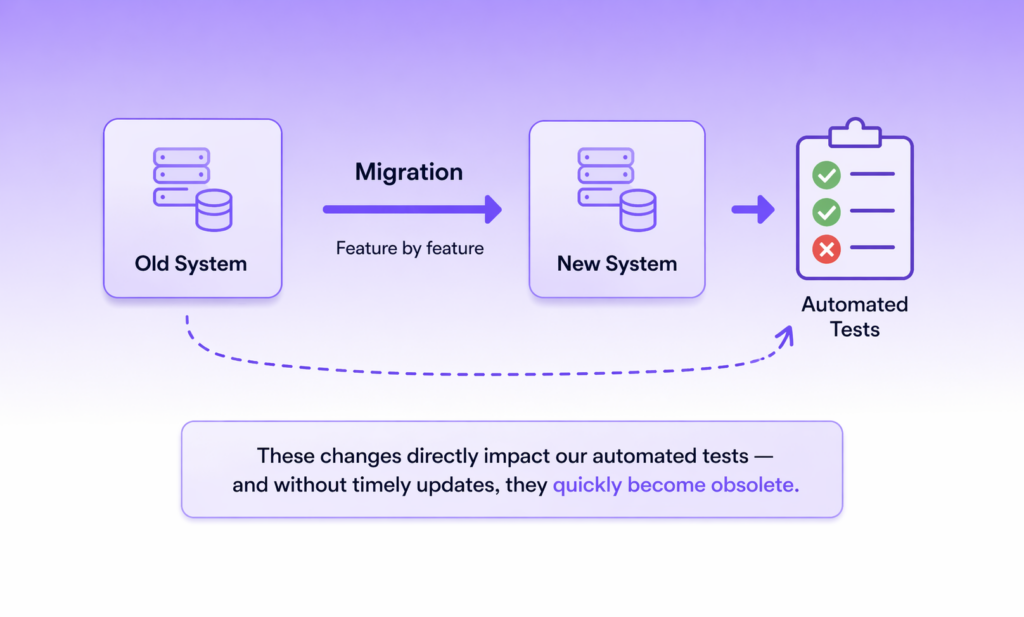
Our team is running a feature-by-feature migration from one internal system to another. Each sprint moves a chunk of functionality across — and every move silently invalidates some part of the automated test suite. Without timely updates, those tests become obsolete.
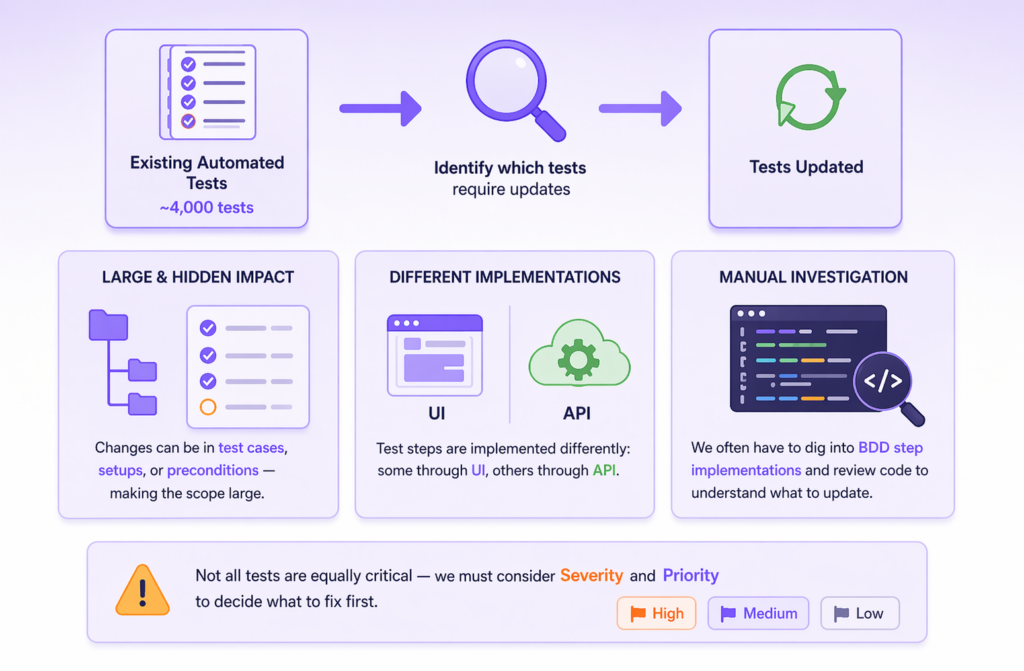
In theory, the task is simple: go through every automated test and check whether its steps need to change. In practice, it’s not. We have around 4,000 automated tests. The relevant changes can live in the test cases themselves or in their setups and preconditions, while test steps are implemented inconsistently by design. Some drive the product through the UI, others through the API. To tell the difference, you have to open the BDD step implementation and read the code. On top of that, not every affected test is urgent, so for each one we also need Severity and Priority from TestRail to decide what to fix first.
The automation
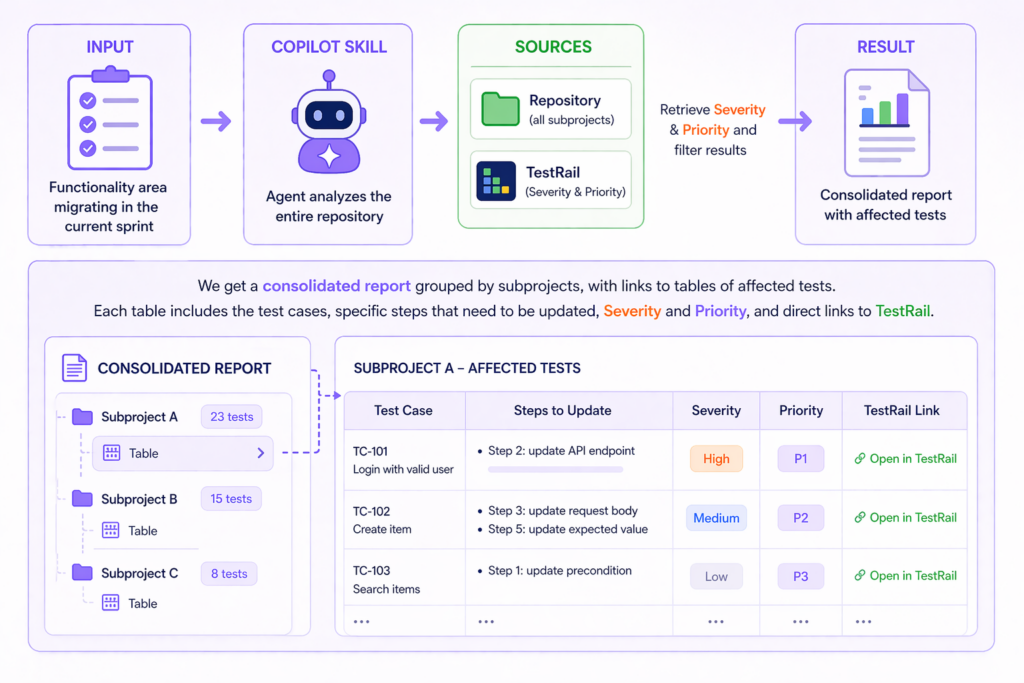
The Copilot CLI automation we built takes a single input: the name of the functional area being migrated in the current sprint. The agent then walks the entire repository and, for each affected test located across all subprojects, queries the TestRail API to pull Severity and Priority and filter the list down to what matters.
The output
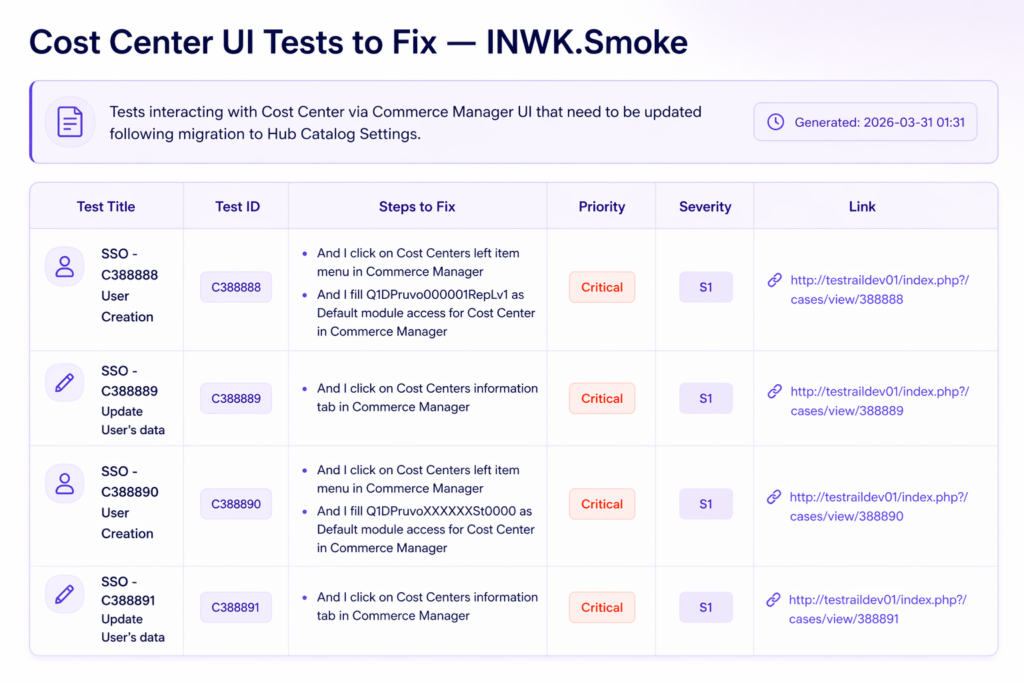
A consolidated report groups the subprojects, with links to per-subproject tables of affected tests. Each table contains the test cases, specific steps that need to be updated, Severity and Priority, and direct links back to TestRail — so a QA engineer can move quickly from the report to the test case they need to fix.
This task is repeated every sprint, once for each piece of functionality being migrated, so the time savings compound. Done manually, building the list of affected tests takes at least a full day. With the Copilot CLI agent, the same task takes about 20 minutes and produces a structured, self-explanatory report at the end.
Use case 2: verifying config changes covered by Technical Release Notes
The problem
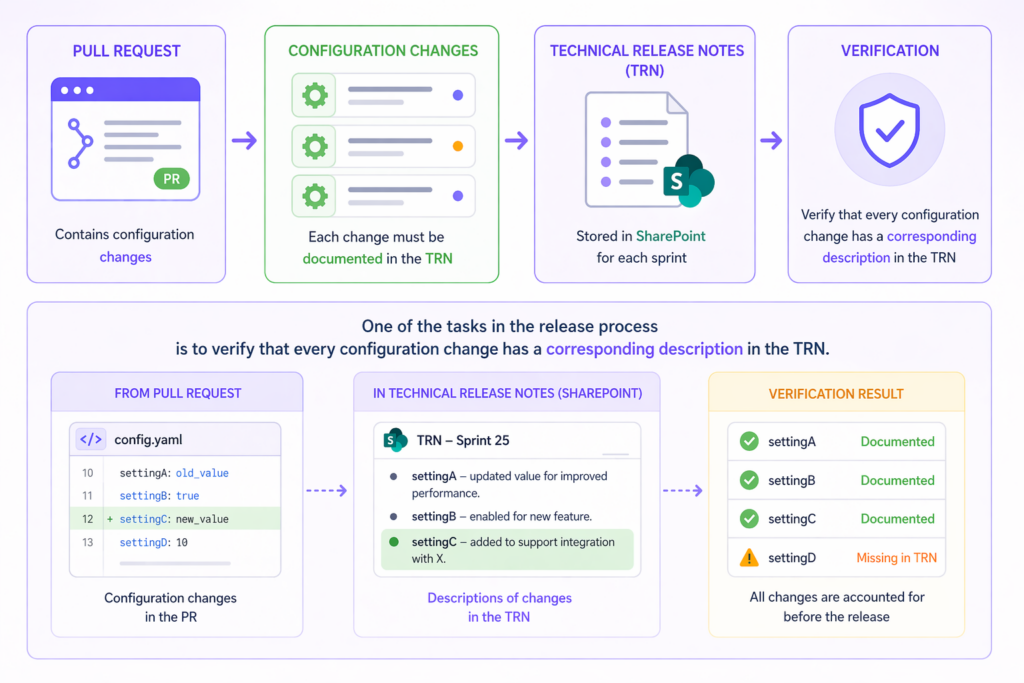
As part of release preparation, we have a pull request (PR) with changes to configuration files. Every such change has to be documented in the Technical Release Notes (TRN), which live as SharePoint pages — one page per sprint. Before a release goes out, someone has to walk the PR line by line and confirm that each config change has a corresponding entry in the TRN.
When the diff is small, this is just a chore. When it’s large — changes spread across many files, some of them touching the same keys — manual tracing becomes genuinely time-consuming, and the human factor kicks in: somewhere in a long list of diffs, a line slips through unnoticed.
The automation
Our automation runs after the PR is created. It parses every change in the configuration files, pulls the TRN pages from SharePoint for the sprint numbers we pass in, and checks whether each change has a matching description.
The output
A consolidated traceability table mapping every config change to its TRN entry. When a change has no description in the TRN, the agent flags it as “No description” — so the release engineer reviews only the flagged rows instead of re-reading the whole diff.
Like the first use case, this one also runs every release cycle. Manually cross-checking a large PR against the TRN could take a couple of hours and still miss things under time pressure. The agent produces a clean, reviewable artifact in a few minutes, and the “No description” marker makes gaps impossible to overlook.
Use case 3: generating a suggested test run from sprint commits
The problem
Our project has roughly 4,000 automated and 4,000 manual tests in TestRail. After each sprint we run a regression pass, and picking which subset of those ~8,000 tests to include is currently a manual exercise. Someone reads the list of completed tasks, maps each task to the functional area it touched, and picks the relevant tests. The quality of the regression run depends heavily on how carefully that mapping is done.
The automation
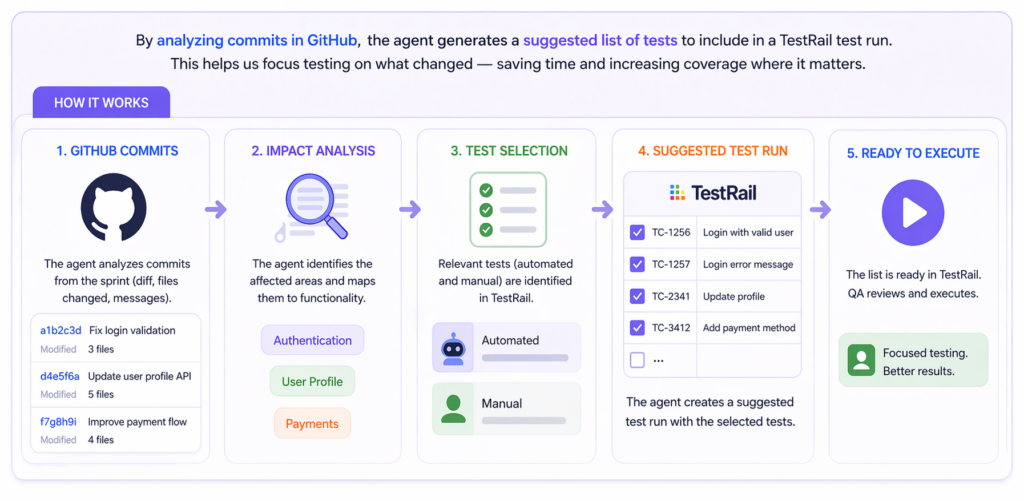
While still in development, the idea behind this automation is to skip the task-list step and go straight to the source. The agent analyzes the commits merged during the sprint in GitHub, maps the changed code to the functional areas it affects, and proposes a corresponding list of tests — automated and manual — for the regression run in TestRail.
The output
The QA lead will have a suggested test run in TestRail, ready for review, adjustments, and launch. The goal isn’t to take humans out of regression scoping — it’s to make sure the starting point reflects what actually changed in the code, not someone’s interpretation of a ticket description.
Takeaways
Looking back at the three use cases, a few things are worth calling out.
- The work itself isn’t complex. None of these automations are doing anything a senior engineer couldn’t do by hand — walking a repo, querying TestRail, reading a SharePoint page, parsing a diff. The value isn’t in clever AI reasoning; it’s that tasks that once took a full day now take twenty minutes, every sprint, and they get done the same way every time instead of depending on who happens to pick them up.
- The division of labor stays clean. In every case the agent produces a structured artifact — a report, a traceability table, a proposed test run — and a human reviews it before anything else happens. Copilot CLI requires explicit approval for every state-changing action, so the agent never commits to the repo, updates TestRail, or edits SharePoint on its own. That isn’t a limitation we’ve worked around; it’s the design we want.
- The leverage comes from connecting siloed systems. Copilot CLI on its own is a coding agent in a terminal — interesting, but not obviously useful for this kind of work. What makes it useful on our project is that we can point it at the repository, TestRail, and SharePoint in the same session and get back a consolidated answer that would otherwise require switching between three or four tools and manually reconciling what each one shows. Aggregating data across disconnected systems is exactly the kind of work agentic AI does better and faster than a human — and it’s where most of the practical value shows up.
This is what AI-accelerated engineering looks like in practice: not AI writing the software, but AI handling the tedious connective work around the software, so the team spends its time on the parts that actually require judgment.